Qwen Coder 30B on a Mini-PC
Testing Qwen3-Coder-30B on a GMKTec K12 mini-PC with an AMD Radeon 780M and 32GB of shared memory to see if it's usable for local AI inference.
Testing Qwen3-coder-30b with a Mini-PC
I am constantly amazed at just how capable these AMD-based mini-PCs perform with AI text inference (image/video generation is another story). I had someone ask about qwen3-coder-30b in the comments of one of my recent videos and it got me thinking. This is a pretty decent-sized model at 18.63GB - meaning I would need to store at least that much in memory if I wanted to have any luck with it. With 32GB shared memory, it "technically" should work, but would it be usable? I have had a 64GB 5600MHz upgrade sitting on my desk for some time so now would be a great time to see the difference between running this model with 32GB and then 64GB. Today we will focus on just using the current 32GB.
The Hardware
GMKTec K12 w/ a Ryzen 7 H 255 w/ Radeon 780M graphics. This is by no means a powerhouse, and as of October 2025 costs about $500 on Amazon. However, this is my daily driver for creating YouTube videos, coding, etc., and I have been impressed so far. The nice thing is that this mini-PC also has an Oculink port so if I ever want to hook an eGPU up to it, I can do that. So far I have not needed to though as I no longer do much gaming. The default 32GB of system memory, which is shared with the 780M (it has no VRAM), has been sufficient for things like gpt-oss-20b, but it definitely has its limits.
So, on to running the model, there are a few important considerations. First, I am running Windows 11 and the way shared memory is handled is a bit wonky. In the BIOS I can set a specific amount of dedicated video memory, there are presets like 512M, 1G, 2G, 4G, etc., all the way up to 16G. Depending on what you set in the BIOS, the actual total amount of shared GPU memory changes. With 32GB of system RAM, when I set aside only 512M for the GPU in the BIOS, the total amount of system RAM the GPU can use in Windows is only ~12GB. But when I dedicate 16G in the BIOS, I get a total of 24.4GB of available GPU memory.
The result is that in order to even load the qwen3-coder-30b model, I need to set a high enough value in the BIOS. For these tests, I am using 16G of memory dedicated to the 780M in the BIOS.
Loading the Model (32GB System Memory)
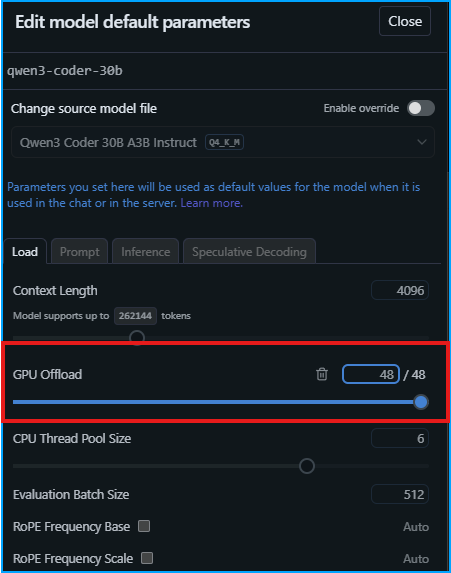
With the 18.63GB model downloaded, there is only one configuration setting that I need to make, which is making sure it is set to fully offload the model to the GPU. One thing to keep in mind is that the context window is only 4096, which might be a bit small.
With that done, it's time to load the model. In total, the 780M is hogging 19.6GB of system memory once the model is loaded. This number includes whatever is needed to just keep my display working. This actually leaves a decent amount of the available 24.4GB left over. The problem is that my system RAM is entirely filled up and I am not sure if I would really be able to do anything but run LM Studio at this point.
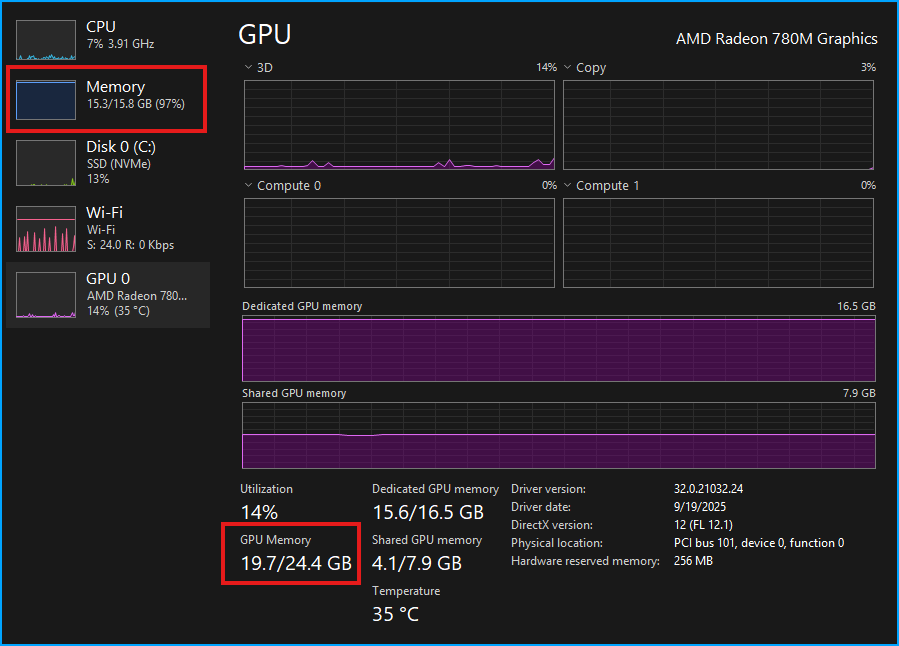
This does make me wonder a bit though, where is the extra 4.7GB of unused memory that is being shared with the GPU? Anyway, we will push forward with the testing to see how this performs! Keep in mind this is a test of the hardware, and not the model. I will ask it to give me starter code to create an MDX blog using NextJS.
As expected, we get full GPU utilization.
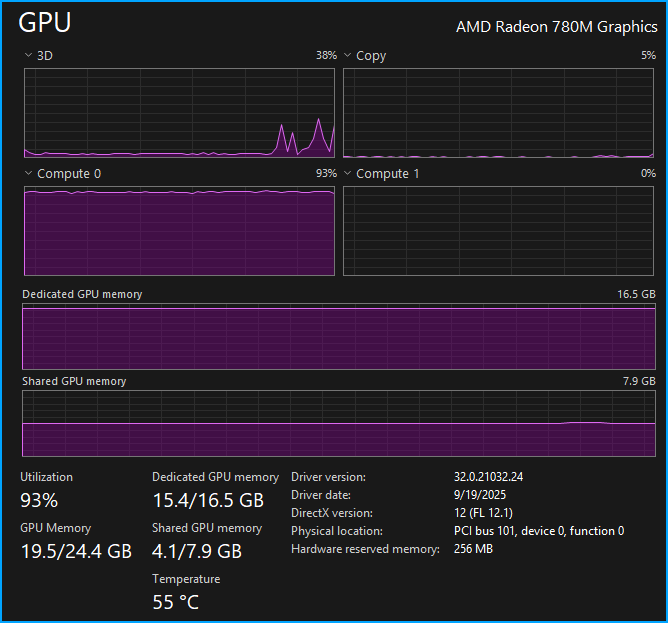
The temps on the K12 stay around 55°C for the entire response, which is great.
The result was a smooth 25.43 tok/sec which in my mind is entirely usable. The problem, of course, is the context, which has already filled up 49.4% with just that one question.
I followed up by asking "What are some good packages to use with this to make it look really professional?" and received another response which came in at 21.16 tok/sec, a small decline in performance which is expected as the context fills. Unfortunately, the context is now 85.7% full.
I asked one final question "Can you tell me how I could add a feature to implement 1 click copy for code snippets?". The performance still felt good, which made sense with 19.34 tok/sec. But unsurprisingly, the context was now 146% full. Now, in LM Studio how context is handled is up to the user, and there are three options: Rolling Window, Truncate Middle, and Stop Chat.
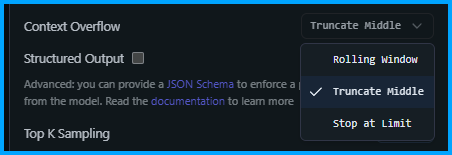
With Rolling Window or Truncate Middle you can keep chatting, but some of the context is lost. With Stop at Limit LM Studio will simply stop generating when the limit is hit (probably the worst option).
Expanding the Context
The qwen3-coder-30b can support a massive 256K context window, although you need significant RAM and GPU power to actually use that much. But what happens if we try to soak up just a bit more of the available memory by doubling the context window? It's actually fine. Going from 4096 to 8192 results in a 0.7GB increase in our GPU memory usage which is now at 20.2GB.
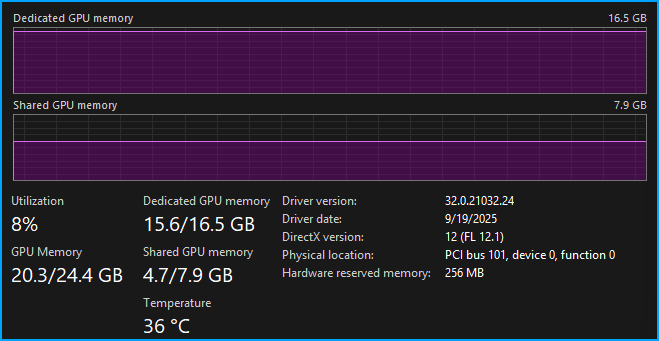
But has the performance changed? Nope, we have a very respectable 24.23 tok/sec for our first response (filled up 33.2% of the context). But a downside of longer context windows is that as the context fills, the model does slow down. To put that to the test I asked a few more questions to fill up the new context window, the result was a meager 14.11 tok/sec, which started to feel a bit slow and painful. Consider that even at 8192 the context is not that large, and fills up quickly. Depending on what you are doing 8192 might be fine, but if you need a large context then doubling the system RAM to 64GB will provide a big boost, but you might find that with the 780M, anything over 8192 becomes painfully slow.
Conclusion
Things were usable with 32GB of RAM assuming you only have LM Studio open. My system RAM usage was at 97% (although everything felt fine) which would be a bit worrying if I needed to have a few other apps open at the same time. This would be the biggest driver to upgrade to 64GB of RAM. Sure, with more RAM you could increase the context window beyond the 8192 in this test, but unless you are willing to take a big hit with tok/sec then it would not really be worth the upgrade. So now it's time for me to finally get around to installing the 64GB of RAM and see how things go! I will for sure have more wiggle room for system RAM, but I do not think I will see a meaningful tok/sec boost with more RAM. I am curious to see what happens if I try to max out the context window. Stay tuned!