Tutorial
OpenClaw Part 6: HTTPS & Clean URLs with Caddy
Harden an OpenClaw setup with HTTPS and clean hostnames. Add Pi-hole DNS records and Caddy reverse-proxy entries so every service loads securely, no warnings.
This post contains paid links (affiliate) — how that works.
Contents
- Prerequisites
- What This Fixes
- Step 1: Add Pi-hole DNS Records
- Step 2: Add Caddy Reverse Proxy Entries
- Step 3: Update OpenClaw Gateway Config
- Step 4: Update OpenClaw's Matrix Config
- Step 5: Update Continuwuity Well-Known
- Step 6: Update Element Web Config
- Step 7: Test Everything
- Element Web
- OpenClaw WebChat
- Full Pipeline
- Series Complete
- Gear used
After Parts 1-5, the setup works but has rough edges. Element Web throws "browser not supported" warnings over HTTP. Service workers won't load, so avatars and uploaded images don't display. Credentials are sent unencrypted on the LAN. And you need an SSH tunnel just to access WebChat.
This is a short one. Three DNS records, three Caddy entries, a few config updates. Takes the setup from "it works on my LAN" to "I'd actually leave this running."
NOTE
This is Part 6 (bonus) of a 6-part series. Everything functional was built in Parts 1-5. This part is polish — HTTPS, proper URLs, no browser warnings, no SSH tunnels.
Prerequisites
- Completed Parts 1-5 (full pipeline working)
- A Caddy reverse proxy with automatic HTTPS (we use Cloudflare DNS challenge for Let's Encrypt certs)
- A Pi-hole DNS server (or any local DNS you manage)
- Caddy and Pi-hole need to be able to reach VLAN 20 (Matrix container) and the OpenClaw machine
What This Fixes
- Element Web "browser not supported" warning — gone
- Service worker errors — gone (media loads properly)
- Plain HTTP credentials — encrypted via HTTPS
- Raw IP URLs (
http://10.1.20.152) — proper subdomains (https://element.hake.rodeo) - SSH tunnel required for WebChat — gone (
https://claw.hake.rodeo)
Step 1: Add Pi-hole DNS Records
All three domains point to Caddy's IP. Caddy handles HTTPS termination and proxies to the actual services.
In Pi-hole's admin UI (or via the REST API):
matrix.hake.rodeo-> your Caddy IP (e.g.,10.1.10.101)element.hake.rodeo-> your Caddy IP (e.g.,10.1.10.101)claw.hake.rodeo-> your Caddy IP (e.g.,10.1.10.101)
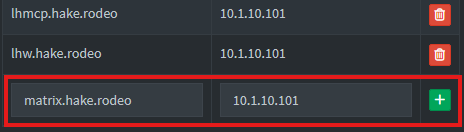
NOTE
Replace hake.rodeo with your own domain, and the Caddy IP with wherever your reverse proxy lives.
Verify all three resolve:
dig +short matrix.hake.rodeo @YOUR_PIHOLE_IPdig +short element.hake.rodeo @YOUR_PIHOLE_IPdig +short claw.hake.rodeo @YOUR_PIHOLE_IP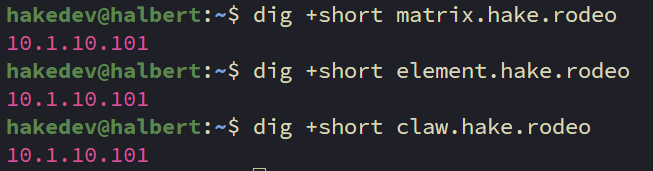
All three should resolve to your Caddy IP.
Step 2: Add Caddy Reverse Proxy Entries
Open the Caddyfile:
nano /etc/caddy/CaddyfileAdd the following three entries:
# Matrix homeserver (Continuwuity)
matrix.hake.rodeo {
    reverse_proxy 10.1.20.152:8008
}

# Element Web Matrix client
element.hake.rodeo {
    reverse_proxy 10.1.20.152:80
}

# OpenClaw Gateway (WebChat + Control UI)
claw.hake.rodeo {
    reverse_proxy YOUR_OPENCLAW_IP:18789
}
Caddy handles WebSocket proxying automatically — no extra config needed for OpenClaw's WebChat connection.
NOTE
If your Caddy uses a global acme_dns block for Cloudflare DNS challenge (like ours does), you don't need per-site TLS config. Caddy handles certificates automatically.
Reload Caddy:
sudo systemctl reload caddyWARNING
Don't use caddy reload from the CLI if your Cloudflare API token is in the systemd environment. The CLI doesn't have access to systemd env vars and will fail with "API token appears invalid." Use systemctl reload caddy instead.
Verify all three endpoints:
curl -sk https://matrix.hake.rodeo/_matrix/client/versions | head -1curl -sk https://element.hake.rodeo | head -5curl -sk https://claw.hake.rodeo | head -5Step 3: Update OpenClaw Gateway Config
Add the new HTTPS URL to the allowed origins so WebChat works through the reverse proxy:
openclaw config set gateway.controlUi.allowedOrigins '["http://localhost:18789","http://127.0.0.1:18789","https://claw.hake.rodeo"]'NOTE
Keep the localhost entries — they're needed if you ever access the UI directly. The new HTTPS entry tells the gateway to accept WebSocket connections from the Caddy-proxied URL.
Step 4: Update OpenClaw's Matrix Config
Update the homeserver URL so OpenClaw connects to Matrix over HTTPS:
openclaw config set channels.matrix.homeserver "https://matrix.hake.rodeo"Now restart the gateway to apply both config changes:
systemctl --user restart openclaw-gatewayStep 5: Update Continuwuity Well-Known
Tell Matrix clients to use the HTTPS URL. Open the config on your Matrix container:
nano /etc/conduwuit/conduwuit.tomlFind the [global.well_known] section and update it:
[global.well_known]
client = "https://matrix.hake.rodeo"
server = "matrix.hake.rodeo:443"
Restart Continuwuity:
systemctl restart conduwuitNOTE
The server_name stays unchanged. We're only updating where clients connect — not the identity.
Step 6: Update Element Web Config
Open the Element Web config:
nano /var/www/element-web/config.jsonUpdate the base_url to use HTTPS:
{
    "default_server_config": {
        "m.homeserver": {
            "base_url": "https://matrix.hake.rodeo"
        }
    },
    "disable_custom_urls": false,
    "disable_guests": true,
    "disable_3pid_login": true,
    "brand": "Element",
    "default_theme": "dark",
    "default_federate": false,
    "room_directory": {
        "servers": []
    }
}
No service restart needed — it's a static file served by nginx.
Step 7: Test Everything
Element Web
Open https://element.hake.rodeo in your browser.
- The "browser not supported" warning should be gone
- The "service worker failed" warning should be gone
- Profile pictures and media should load
- The padlock icon shows a valid Let's Encrypt certificate
Log in and verify the bot is connected.
OpenClaw WebChat
Open https://claw.hake.rodeo in your browser. You'll be prompted for the gateway token — enter it to authenticate.
After entering the token, WebChat will show "pairing required." This is the device approval flow. On the OpenClaw machine, check for the pending request:
openclaw devices list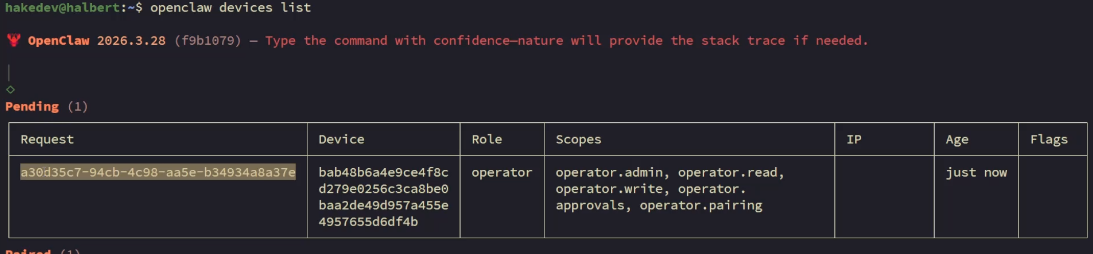
You should see a pending request from the new WebChat connection. Approve it using the request ID:
openclaw devices approve REQUEST_ID
Refresh the WebChat page — it should connect. Chat with the agent to confirm it's working.
No more ssh -L 18789:localhost:18789 — just a clean URL.
Full Pipeline
Trigger a failure to test the complete pipeline over HTTPS:
pct exec 150 -- systemctl stop nginxThe investigation report should land in Matrix through the HTTPS connection. After verifying:
pct exec 150 -- systemctl start nginxSeries Complete
Six parts, one AI monitoring pipeline:
- Part 1 — OpenClaw + Ollama on Strix Halo
- Part 2 — Diagnostic scripts + Uptime Kuma incident response
- Part 3 — Matrix integration for a proper command center
- Part 4 — Local model shootout (6 models compared)
- Part 5 — Backup, restore, and maintenance
- Part 6 — HTTPS & clean URLs with Caddy
From a fresh Ubuntu Server to a fully self-hosted AI monitoring system with automated incident investigation, Matrix reporting, tested backups, and HTTPS. Running entirely on local hardware with no cloud dependencies.